Actifile Client Onboarding
Prepared by MatrixIT.net · Your Trusted Partner in Managed IT
Empowering Your IT with Flexible, Expert Support · 25 Years of Trusted IT Solutions
Client: ____________________ Date: ____________________
Meeting Objective
Why We’re Here
Welcome to the first of three meetings in the Actifile onboarding process. Today we will introduce Actifile, explain how it works, outline the deployment process, and set expectations for the next steps.
The Three-Meeting Journey
Meeting 1 (Today): Kickoff — understand Actifile, review your environment, and preview what information we need.
Meeting 2: Discovery — collect every deployment variable and schedule the installation weekend.
Meeting 3: Post-install review — after the first scan, review findings and train your team on the dashboard.
Onboarding Roadmap
What Is Actifile?
Actifile is an AI-based data security platform that automatically identifies, quantifies, classifies, monitors, and values your sensitive data with minimal effort. It works across endpoints, cloud storage, and NAS.
Scan & Identify
Map active and dormant sensitive data across all silos, users, endpoints, cloud, and NAS
Encrypt & Protect
Apply invisible file-level encryption; stolen files become unreadable even if exfiltrated
Monitor & Report
Continuous auditing, real-time alerts, risk quantification in dollars, and compliance reporting
How It Works
Actifile Agent
Installed on Windows, macOS endpoints; scans files locally
Cloud Portal
Results reported to app.actifile.com; risk scores calculated
Dashboard
MatrixIT and (optionally) you view findings, take action, manage policies
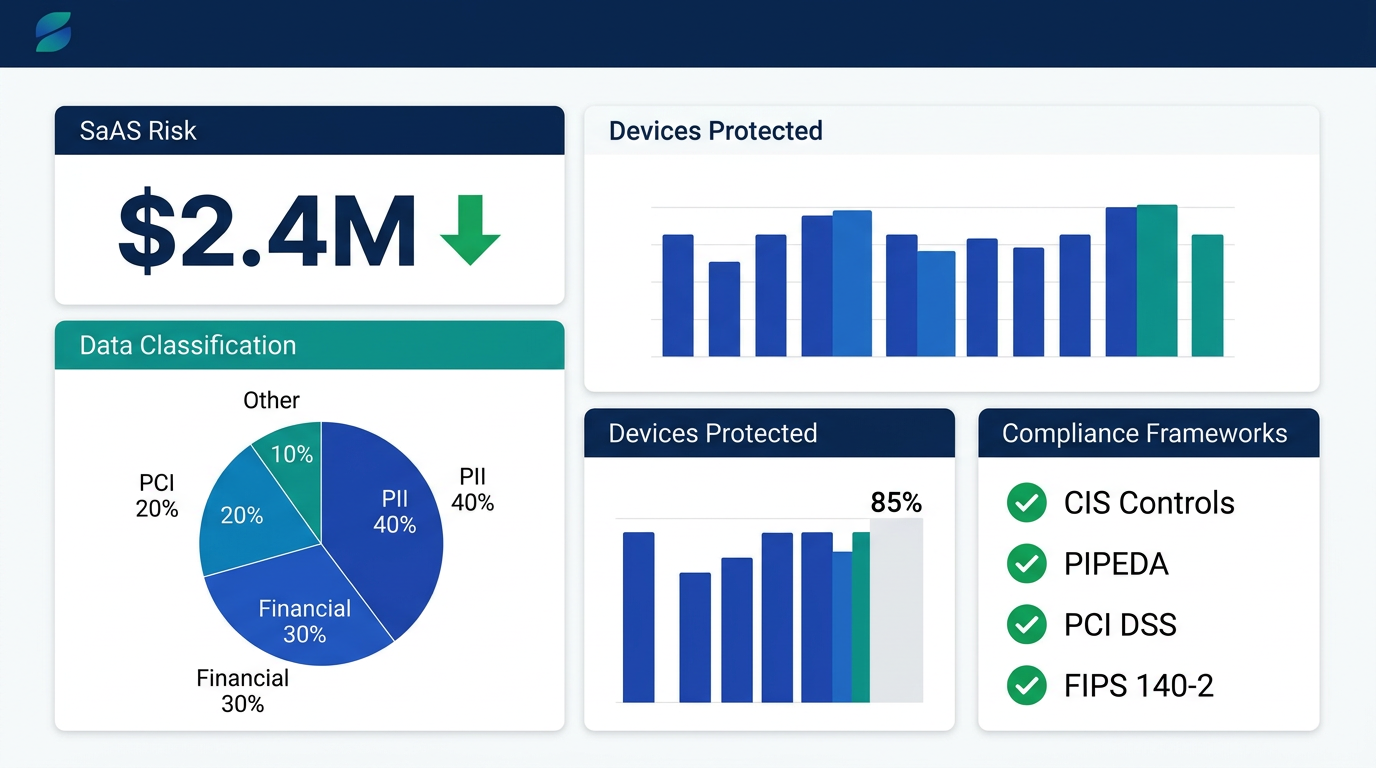
Actifile Compliance Dashboard – Risk quantification, data classification, and compliance tracking
Try the self-paced interactive tour →
Why Actifile? – Built for Financial Services
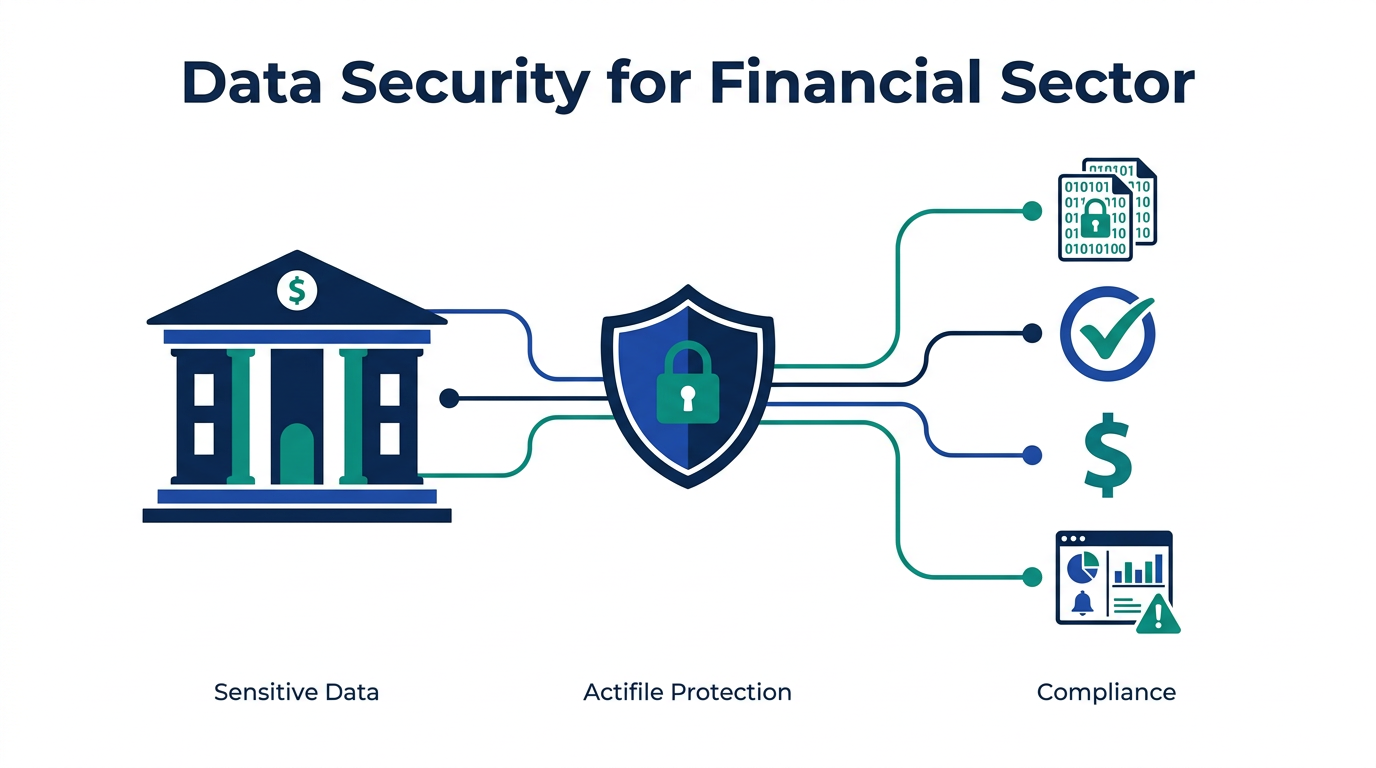
Protecting What Matters Most: Member Data
Credit unions and financial institutions handle some of the most sensitive data in any industry — Social Insurance Numbers, account numbers, mortgage applications, loan documents, and payment card data. A single breach can cost millions in regulatory fines, member lawsuits, and reputational damage. Actifile was purpose-built to help financial organizations find, quantify, and protect this data automatically, with minimal IT overhead.
Who Uses Actifile?
Credit Unions
NCUA, PIPEDA, PCI DSS, CIS Controls
Banks & Lenders
OSFI, FDIC, PCI, GDPR
Insurance
PII, claims data, policy documents
Wealth Management
Investment records, KYC, AML
Why Financial Institutions Choose Actifile
✓ Automated data discovery — no manual file-by-file review; Actifile scans every endpoint, server, and cloud share
✓ Risk quantification in dollars — translate data exposure into financial terms your board and regulators understand
✓ Invisible encryption — file-level protection that is transparent to users; stolen files become unreadable
✓ Continuous compliance monitoring — real-time alerts for sensitive file operations, upload spikes, and policy violations
✓ Minimal IT footprint — lightweight agent, no infrastructure to manage, cloud portal for centralized reporting
✓ MSP-managed — MatrixIT handles deployment, monitoring, and tuning so your team can focus on serving members
CIS Controls – How Actifile Covers IG2 & IG3
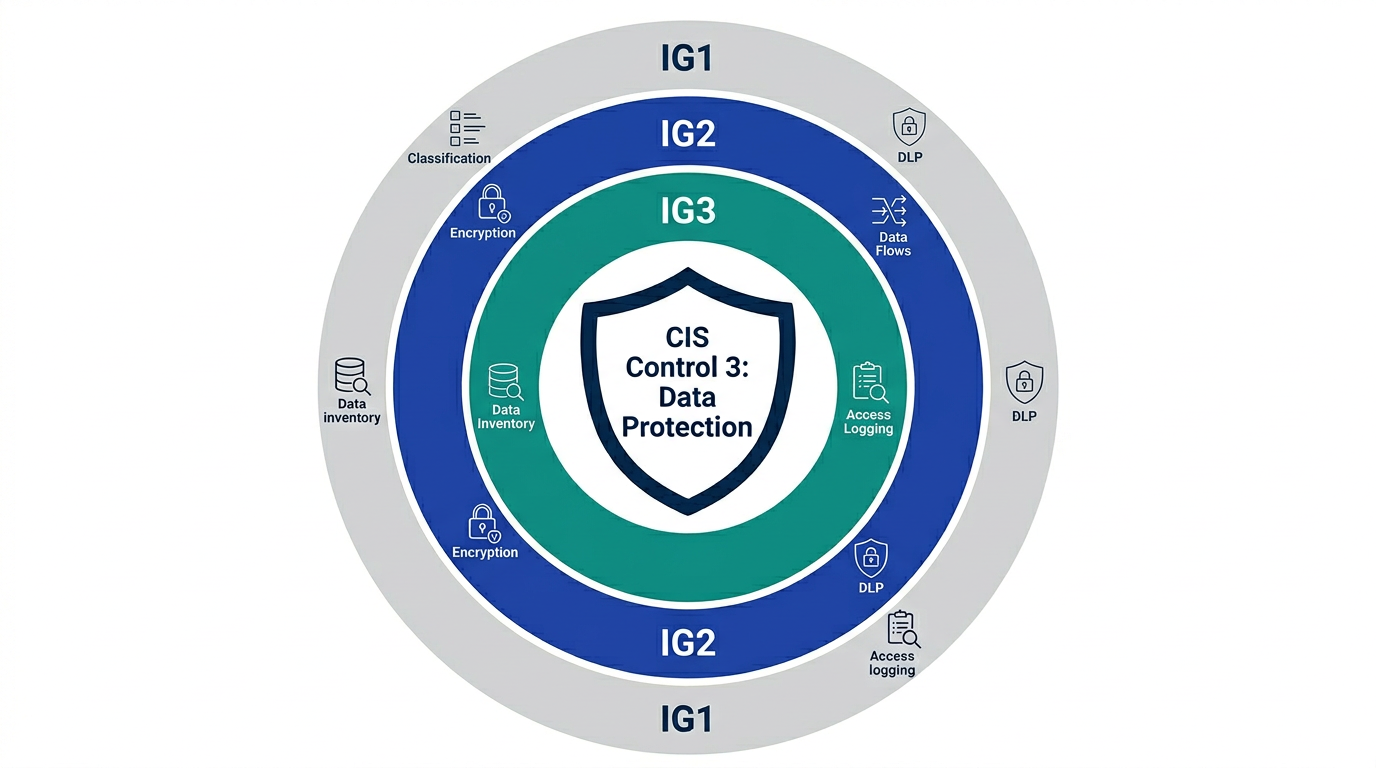
CIS Controls v8 – Control 3: Data Protection – Implementation Group coverage map
Credit unions following CIS Controls need to demonstrate compliance with Implementation Groups. Actifile directly addresses CIS Control 3: Data Protection across IG2 and IG3, providing automated coverage for safeguards that are otherwise manual and labor-intensive.
Controls 3.1 – 3.12
Controls 3.1 – 3.14
CIS Control 3: Data Protection – Actifile Coverage
What This Means for Your Credit Union
Actifile provides automated, continuous coverage for 12 of 14 CIS Control 3 safeguards (direct or contributing). For credit unions at IG2, Actifile covers the full data protection control set. At IG3, it adds DLP-equivalent functionality (3.13) and sensitive data access logging (3.14). This significantly reduces the manual effort and audit burden for your annual CIS assessment.
Supported Environments
| Platform | Supported Versions | Notes |
|---|---|---|
| Windows | Server 2016, 2019, 2022; RDS; Win 8, 10, 11 (Intel) | ARM not supported |
| macOS | Big Sur 11.x, Monterey 12, Ventura 13 | Intel + Apple Silicon (M1/M2) |
| Cloud | SharePoint Online, OneDrive for Business | Google Workspaces: in development |
| NAS | All NFS-mountable NAS | — |
| Hardware | 4 GB RAM minimum; Intel CPU | Atom: not recommended |
| Browsers (Portal) | Chrome, Edge, Firefox, Safari, Opera | — |
Regulation & Compliance
MatrixIT aligns Actifile configuration with the regulatory frameworks that apply to your organization. During our Discovery meeting, we will confirm which of these apply:
Matrix IT Policies
Internal governance & delivery
Canada – PII
Personal identifiable information
Canada – PIPEDA
Federal privacy law
Global – PCI
Payment card data
Global – IT
ISO 27001, SOC 2, GDPR
Questions we will ask during Discovery (Meeting 2):
- Matrix IT policies: “Are you comfortable with our governance framework? Need a copy?”
- Canada PII: “Specific Canadian PII obligations (sector, province, contract)?”
- PIPEDA: “Does PIPEDA apply? Provincial laws (B.C. PIPA, Quebec Law 64)?”
- PCI: “Do you process payment card data or need PCI DSS alignment?”
- Global IT: “ISO 27001, SOC 2, GDPR, or other standards?”
- Other: “Any other regulatory or contractual requirements?”
Deployment Options Overview
Windows / macOS (Endpoint Agents)
RMM Push
Kaseya VSA, ConnectWise, N-able, Continuum, ITarian, Acronis
PowerShell
deployActifile.ps1 – auto-download and install
Manual MSI
Download from portal, GUI or silent MSIEXEC
PDQ Deploy
Free or licensed; FQDN + installkey
PsExec
Sysinternals; SYSTEM account batch install
Logon Script
AD batch script; checks if installed
Cloud & NAS
Windows App (CLI/GUI)
For M365 SharePoint / OneDrive scanning
Docker Container
Deploy cloud agent locally with Docker
Azure VM
Deploy Actifile on Microsoft Azure
What We Need from You (Preview)
In our next meeting (Discovery), we will walk through detailed forms to collect the exact variables needed for deployment. Here is a preview of the information categories:
Company & Contacts
Primary/secondary contacts, email, phone for deployment coordination
Environment Inventory
Device counts (Windows, Mac, servers, RDS), cloud users, NAS shares
RMM & Tooling
Which RMM (Kaseya VSA version, ConnectWise, etc.), deployment tool preferences
Network & Access
UNC paths, FQDN resolution, admin credentials, firewall rules
Cloud Config
M365 admin access, Azure app registration, config file generation method
Security & AV
AV/EDR product, allowlist capability, tamper resistance preferences
Compliance
Applicable frameworks: PII, PIPEDA, PCI, ISO, SOC, GDPR
Installation Weekend
Preferred date, computers must stay powered on for initial scan
Contacts & Support
MatrixIT
Email: proservices@matrixit.net
Phone: (613) 232-0648
Web: matrixit.net
Address: 5320 Canotek Rd, Ottawa, ON K1J 9C1
Actifile Support
Support: support.actifile.com
Management: my.actifile.com
App portal: app.actifile.com
Onboarding: actifile.com/onboarding
Appendix – Documentation Map
Full documentation at support.actifile.com. Click any card for details:
Deploy Windows 13
PDQ, PowerShell, PsExec, MSI, RMM integrations
Deploy macOS 9
Silent, MDM, deployment script
Deploy Cloud 11
CLI, Docker, Azure VM, M365 config
Deploy NAS 3
NFS mount, scan interval
Identify Data 13
Classifiers: content, folder, extension
Protect Data 12
Encryption, FIPS 140-2, allowlisting
Monitor Risk 10
Alerts, shell extensions, agent status
Manage Tenants 6
Security groups, switching, deactivation
Troubleshooting 18
Agent install, SSL, performance, decryption
Direct installer links:
Windows MSI: app.actifile.com/Home/DownloadAgentMsi
macOS: app.actifile.com/Home/DownloadMacAgent
PowerShell deploy script: deployActifile.ps1
Interactive tour: Launch tour