Monitor Phase: Ongoing Operations
Prepared by MatrixIT.net
Client: ____________________ Date: ____________________
Meeting Objective
Transition to Operational Mode
Your Actifile deployment is now fully operational — data is being identified, classified, encrypted, and protected. This final onboarding meeting transitions you into ongoing monitoring and operations. We will:
- Configure alerts and notification preferences
- Train your team on risk monitoring tools
- Establish escalation procedures and responsibilities
- Define the ongoing review cadence between MatrixIT and your team
- Review CIS Controls compliance status and reporting
Actifile Lifecycle – You Are Here
Deploy
Agents installed, tenant configured
Identify
Scan, classify, map sensitive data
Protect
Encryption, rules, allowlisting
Monitor
Alerts, risk tracking, compliance
Current Environment Status
Risk Reduction Achievement
Since deployment, your data risk value has decreased from $___ to $___, representing a ___% reduction in financial exposure. This is the direct result of Actifile identifying and encrypting sensitive data across your environment.
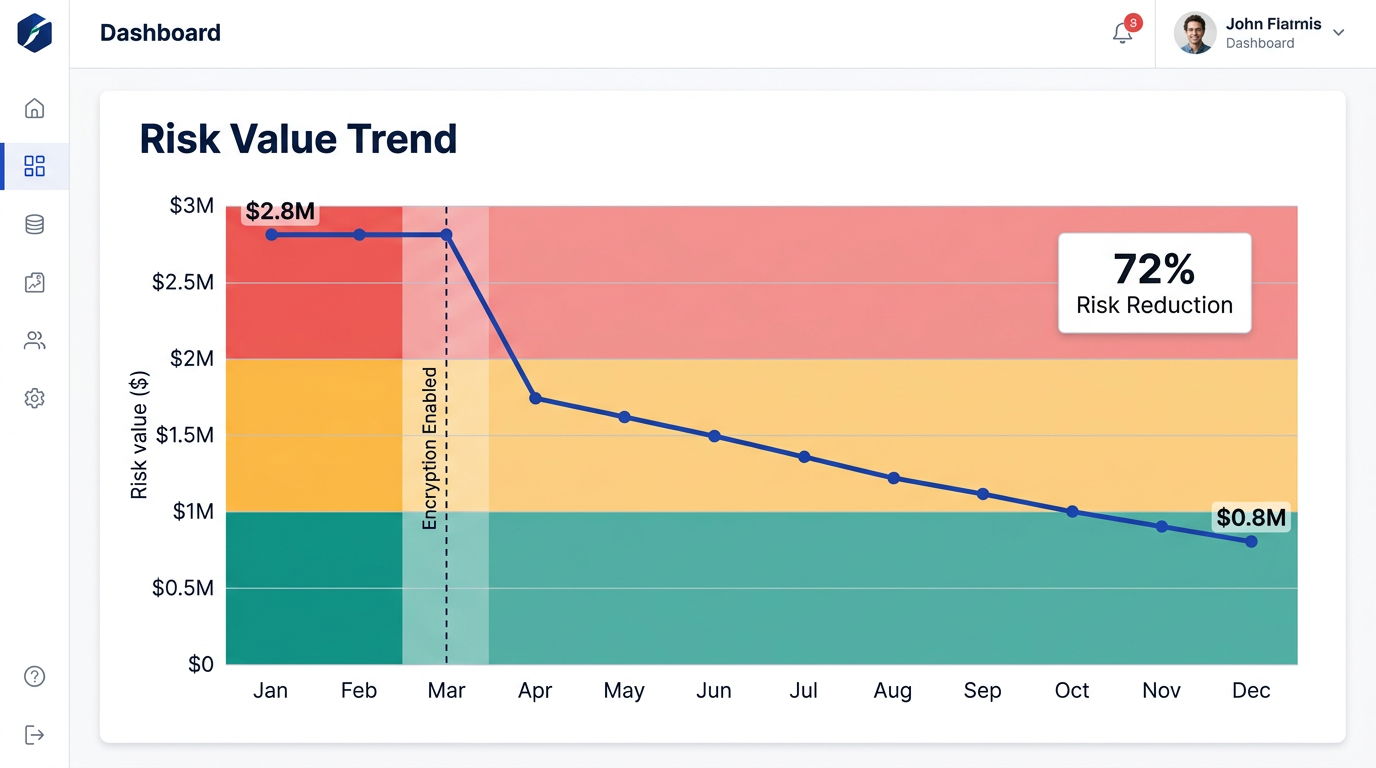
Risk Value Trend Over Time – showing impact of encryption enablement
Monitoring Capabilities
Risk Dashboard
Real-time risk overview with dollar-value exposure, device status, and data classification breakdown
Smart Alerts
Configurable alerts for sensitive file operations, upload spikes, agent issues, and policy violations
Compliance Reports
Exportable reports for CIS Controls, PIPEDA, PCI DSS audits showing data protection coverage
Alert Types & Configuration
Actifile supports multiple alert categories. We will configure these together based on your operational needs:
Sensitive File Operations
Triggered when sensitive files are copied, moved, deleted, renamed, or emailed. Critical for detecting potential data exfiltration.
Upload Spike Detection
Detects abnormal upload activity — large volumes of files being uploaded or synced unexpectedly. Early ransomware or insider threat indicator.
Agent Status Alerts
Notification when an agent goes offline, stops reporting, or encounters errors. Ensures continuous coverage across all devices.
New Sensitive Data Detected
Alert when previously unseen sensitive data appears on a device — new files created, downloaded, or received that match classifiers.
Encryption Policy Violation
A file that should be encrypted is found unencrypted, or an unauthorized app attempted to access encrypted data.
Risk Score Threshold
Triggered when the overall data risk value exceeds a configured dollar threshold. Indicates growing exposure requiring attention.
Alert Configuration Worksheet
| Alert Type | Enabled | Recipients | Frequency |
|---|---|---|---|
| Sensitive file operations | □ Yes □ No | □ Immediate □ Daily digest | |
| Upload spike | □ Yes □ No | □ Immediate □ Daily digest | |
| Agent offline | □ Yes □ No | □ Immediate □ Daily digest | |
| New sensitive data | □ Yes □ No | □ Immediate □ Daily digest | |
| Policy violation | □ Yes □ No | □ Immediate □ Daily digest | |
| Risk threshold ($____) | □ Yes □ No | □ Immediate □ Daily digest |
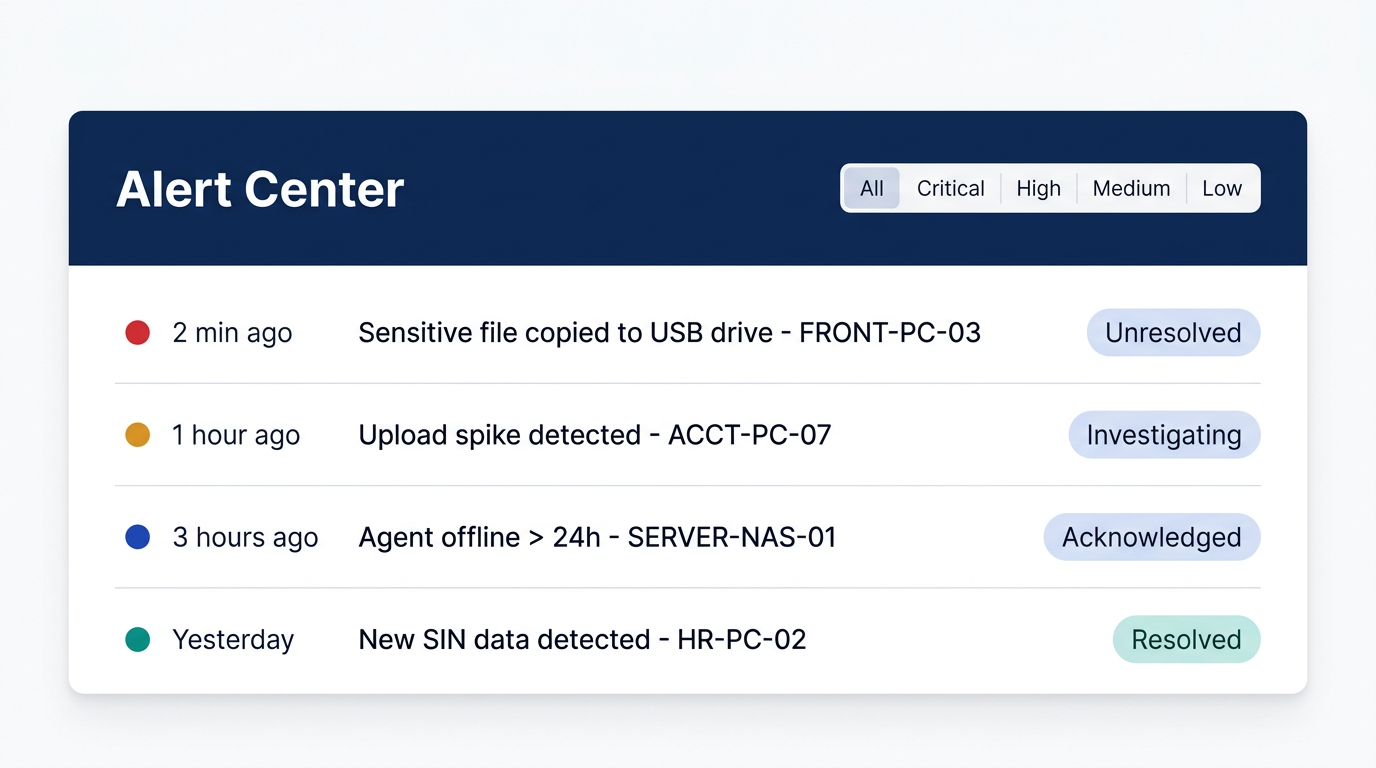
Actifile Portal – Alert Center
Desktop Monitoring Tools
Windows Shell Extensions
Right-click any file to access Actifile options:
- View file classification and sensitivity level
- Check if file is encrypted
- Manually encrypt or decrypt a file
- View file risk details
- Scan a specific file on demand
Content Detector Tool
Inspect exactly what sensitive data was found:
- View detected PII patterns (SIN, CC, account #)
- See exact location within the file
- Test regex patterns against files
- Verify classifier accuracy
- Useful for investigating false positives
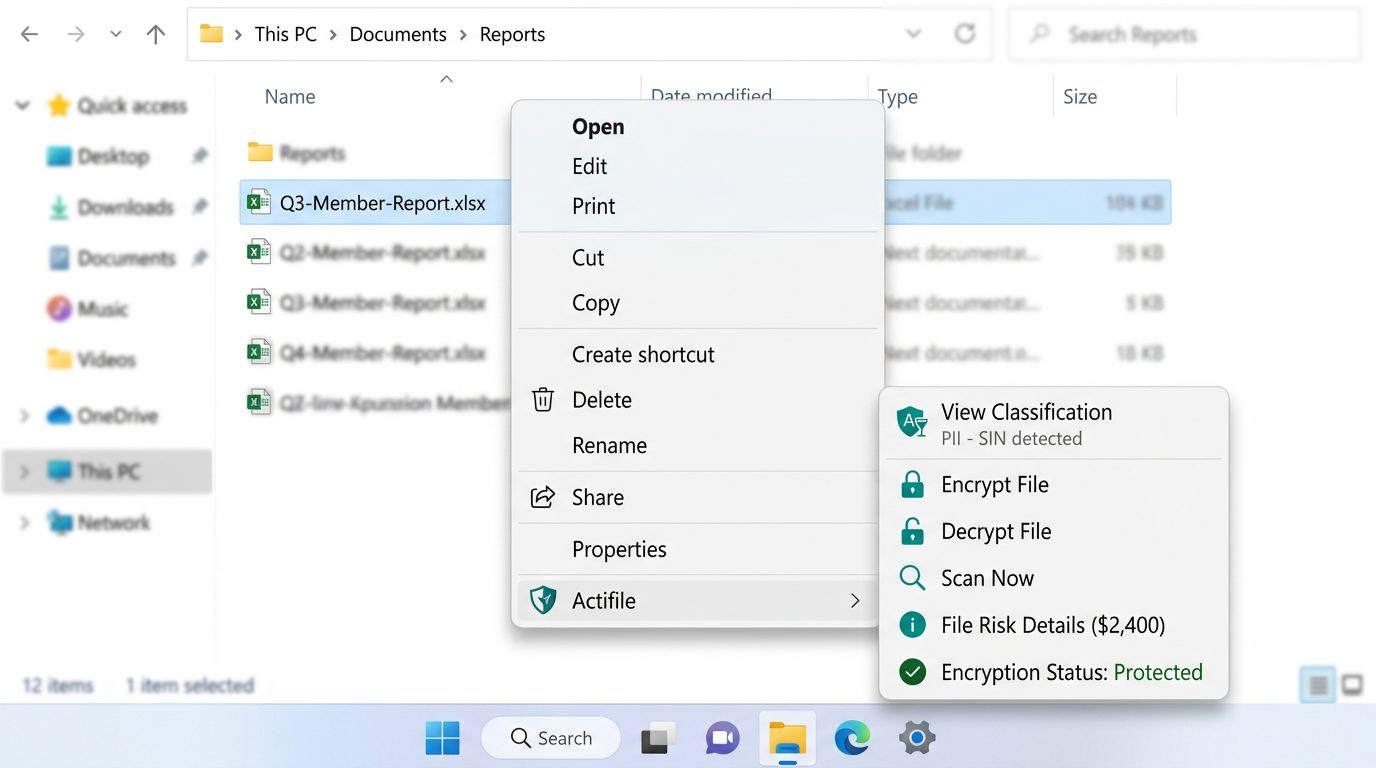
Windows Right-Click Menu – Actifile Shell Extensions
Escalation Procedures
When an alert fires, who responds and how? Define your escalation matrix:
Critical — Potential Data Breach
Mass file exfiltration, agent tamper detected, encryption bypassed. Respond within 1 hour.
Contact: Escalate to:
High — Policy Violation or Upload Spike
Unusual file activity, unauthorized access attempts, single-device policy breach. Respond within 4 hours.
Contact: Escalate to:
Medium — Agent Issues or Risk Threshold
Agent offline > 24h, risk score spike, scan failures. Respond within 1 business day.
Contact: Escalate to:
Low — Informational
New sensitive data detected, classifier match on low-risk category, scheduled scan complete. Review at next check-in.
Contact:
Ongoing Review Cadence
| Frequency | Activity | Owner | Deliverable |
|---|---|---|---|
| Monthly | Risk Review Call Dashboard walkthrough, risk trends, agent health, new findings |
MatrixIT + Client IT | Risk summary report |
| Monthly | Agent Health Check Verify all agents reporting, address offline/stale agents, update as needed |
MatrixIT | Agent status report |
| Quarterly | Policy & Classifier Review Tune classifiers, review protection rules, address false positives, add new classifiers |
MatrixIT + Client IT | Updated policy document |
| Quarterly | Compliance Report Generate CIS Controls coverage report, PIPEDA/PCI compliance evidence |
MatrixIT | Compliance report (PDF) |
| Annual | Full Security Review Comprehensive review: encryption coverage, risk reduction, CIS Controls gap analysis, roadmap |
MatrixIT + Client Exec | Annual security brief |
| As Needed | Incident Response Investigate alerts, potential breaches, unusual activity. MatrixIT first line. |
MatrixIT (lead) + Client | Incident report |
| As Needed | New Device Onboarding Deploy Actifile to new devices, onboard new users, update security groups |
MatrixIT | Updated device inventory |
CIS Controls – Full Coverage Status
With all four lifecycle phases complete, here is your CIS Control 3: Data Protection coverage for your credit union’s IG2/IG3 compliance:
| Safeguard | Description | Deploy | Identify | Protect | Monitor |
|---|---|---|---|---|---|
| 3.1 | Data management process | ● | ● | ● | ● |
| 3.2 | Data inventory | ● | ● | ● | |
| 3.6 | Encrypt data on devices | ● | ● | ||
| 3.7 | Data classification scheme | ● | ● | ● | |
| 3.8 | Document data flows | ● | ● | ||
| 3.9 | Encrypt removable media | ● | ● | ||
| 3.11 | Encrypt data at rest | ● | ● | ||
| 3.12 | Segment by sensitivity | ● | ● | ● | |
| 3.13 IG3 | Data loss prevention | ● | ● | ||
| 3.14 IG3 | Log sensitive data access | ● |
● = Active coverage at this phase ● = Ongoing monitoring ensures continued compliance
Understanding Risk Value Changes
Risk values will fluctuate over time. This is normal. Common reasons include:
↑ Risk Increases
- New sensitive files created or downloaded
- New devices added without Actifile agent
- Cloud storage changes (new SharePoint sites)
- Employee saves sensitive data to unprotected location
- New classifier detects previously unclassified data
↓ Risk Decreases
- Files encrypted by Actifile protection rules
- Sensitive files securely deleted
- Improved classification reducing false positives
- Data consolidated to fewer, protected locations
- Old devices decommissioned and cleaned
Operational Handover & Next Steps
Client Responsibilities (Ongoing)
- Review alert emails and escalate P1/P2 to MatrixIT immediately
- Report any user complaints about file access issues
- Notify MatrixIT of new devices, users, or applications
- Participate in monthly risk review calls
- Provide access for quarterly compliance report generation
- Keep agent software updated (MatrixIT will coordinate)
- Inform MatrixIT of any organizational changes (mergers, new offices, departures)
MatrixIT Responsibilities (Ongoing)
- Monitor Actifile dashboard daily for critical alerts
- Conduct monthly risk review and agent health check
- Generate quarterly compliance reports (CIS, PIPEDA, PCI)
- Tune classifiers and protection rules as needed
- Deploy agents to new devices within agreed SLA
- Respond to P1 incidents within 1 hour
- Coordinate agent updates and version upgrades
- Annual comprehensive security review and roadmap
Onboarding Complete
With this meeting, the Actifile onboarding process is complete. Your credit union now has a fully operational data security platform covering the complete lifecycle: Deploy → Identify → Protect → Monitor. MatrixIT will continue to manage and optimize your deployment as your trusted partner.
Key Numbers to Remember
Contacts & Support
MatrixIT
Email: proservices@matrixit.net
Phone: (613) 232-0648
Web: matrixit.net
Emergency: (613) 232-0648 (press 1 for urgent)
Actifile Support
Support: support.actifile.com
Portal: app.actifile.com
Shell Extensions: Shell Extensions Guide
Alerts: Alert Configuration